Every card
in its place.
No piles, no searching. Collabel prints neat labels for your toploaders, binders and boxes, with name, set, number and a QR code to the price. So you always know what you have, where it is and what it is worth.
Coming soon to Google Play · for Android
- No account needed
- 25 labels free
- NIIMBOT, Phomemo and more
 Charizard ex151199/165
Sound familiar?
Your collection grows faster than your overview.
Boxes full of toploaders
Everything is somewhere, but without labels every box is a surprise.
Searching for that one card
You know you have it. But in which binder, on which page?
What is it worth now?
For every price you type the card name into a search bar again.
Collabel fixes that: a label on every card, a place for every card, and one scan to the price.
Done in three steps
Your first label in under a minute. No account, no hassle.
Cards
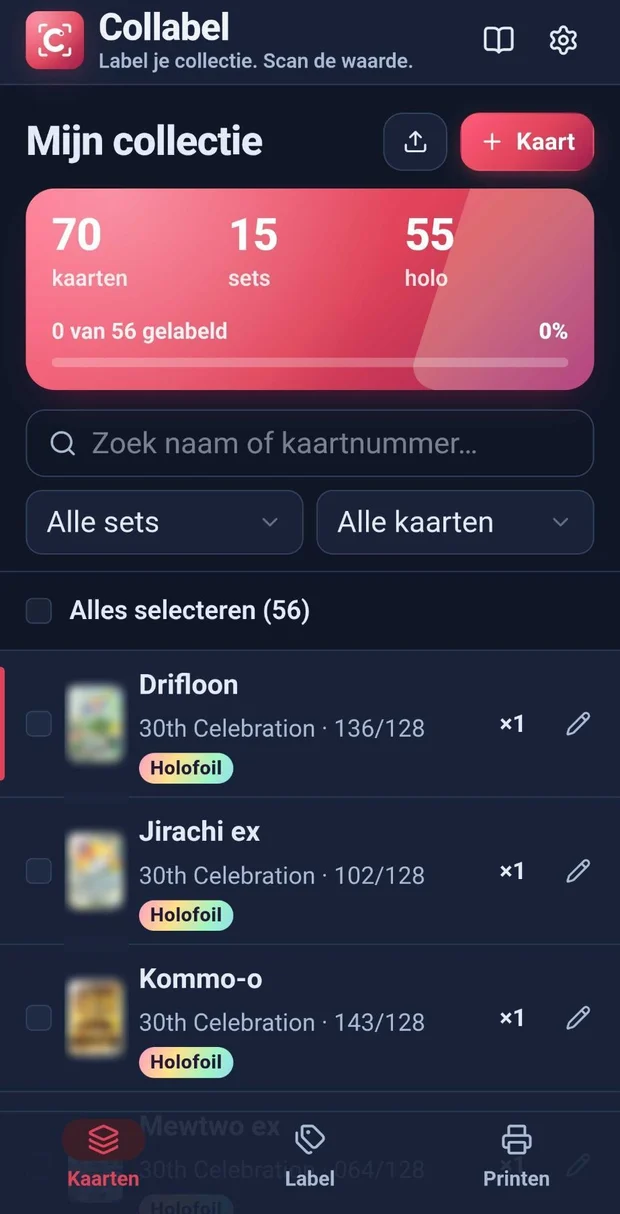
Import your collection as a CSV from Collectr or another collection app, add a single card, or start with sample cards.
Label
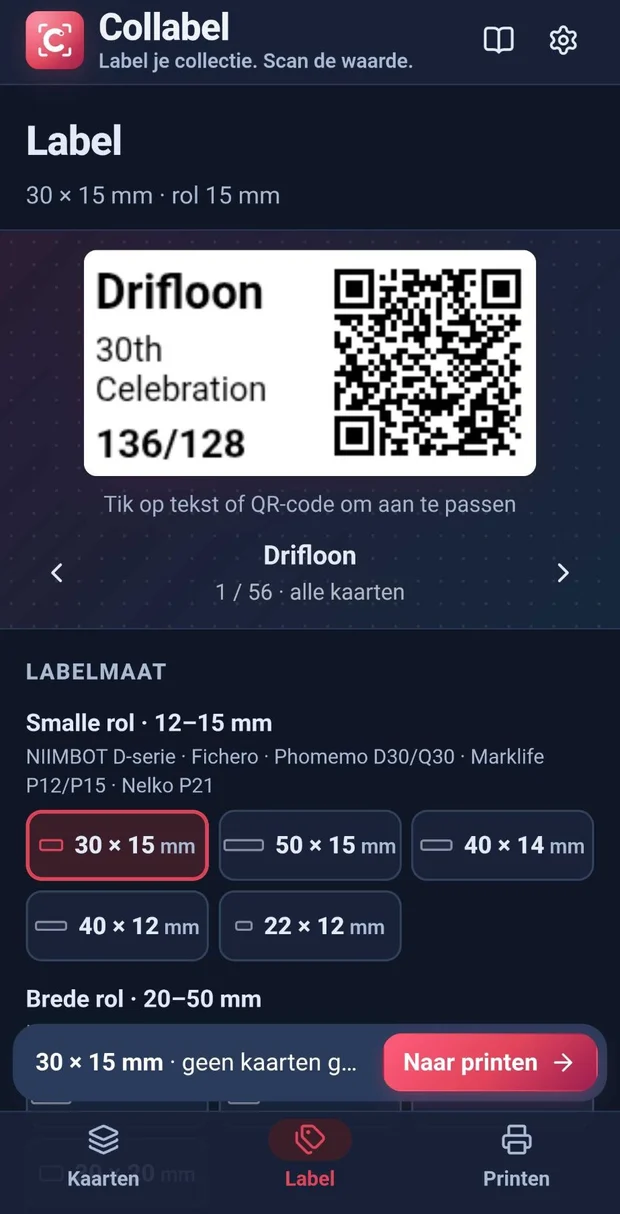
Choose the size of your label roll and make the design yours: drag text with your finger and make text or QR bigger or smaller.
Connect your label printer over Bluetooth and print. No label printer? Save a PDF for your home printer.
Everything for a tidy collection
Made by a collector, for collectors.
Design with your finger
Drag the name, set or number to another spot and make text or QR bigger or smaller. The label always stays neatly fitted.
QR to the price
Scan the label to see search results with the price on Cardmarket, TCGplayer or another site. Or set your own link per card.
Start right away
Import your CSV from Collectr, add a single card, or try it first with sample cards.
See your cards
Card photos are looked up automatically when available, with a holo shine for your shiny cards.
Know where every card is
Give cards a location, like Binder 2 · page 5. Search and filter by it. With Pro the location is on the label too.
Set labels
One label per set with the number of cards and the location, for storage boxes and binder tabs.
Works with your printer
Recognises your printer, only shows the label sizes that fit and helps you when Bluetooth is off.
No label printer needed
A PDF with all labels on A4 with cut lines. With Pro also an Excel list for Word and label software.
Private
Your collection stays on your phone. No account needed, no ads, no tracking.
Selling at card shows?
At a card show you don't want to hunt for a pen or stickers. With Collabel and a label printer in your bag, you print a neat label in seconds, right at your table.
Fits in your bag: a mini label printer like the NIIMBOT D110 or B1 runs on a battery.
- A label for every new card, fast
Bought or traded a card? Enter name, set and number and print. Done before the next customer walks up.
- Buyers check the price themselves
With the QR code on the label, a buyer looks up the value on their own phone. That makes talking price easier.
- Your stock in order
Set labels on your boxes and a location for every card, so you grab the right card straight away.
Works with popular mini label printers
Bluetooth label printers from these brands are supported.
NIIMBOT is tested on real printers; the other brands are newly supported, so always print one test label first. The DYMO LetraTag prints text only (no QR).
Fair pricing
Try everything for free with your own printer. Want to label your whole collection? There is Pro.
Free
- 25 labels via your label printer or PDF
- All printers, label sizes and design options
- Add and import unlimited cards
- Card photos and QR to the price
Collabel ProPRO
- Unlimited labels, even your whole collection at once
- Set labels for boxes and binder tabs
- The location on the label, like Binder 2 · page 5
- Excel export for Word and label software
- You support an independent app for collectors
Prefer monthly? €2.99 per month, cancel any month.
Free and Pro side by side
| Free | Pro | |
|---|---|---|
| Print labels or save as PDF | 25 | Unlimited |
| All printers and label sizes | ||
| Design with your finger | ||
| Add and import cards | Unlimited | Unlimited |
| Card photos and QR to the price | ||
| Set labels | – | |
| Location on the label | – | |
| Excel export | – |
Google Play shows the price in your currency. Subscriptions renew automatically until you cancel; you can cancel anytime in Google Play.
What do you want in Collabel?
Vote for what matters most to you, or send your own idea. We pick up the most popular wishes first.
- iPhone versionCollabel on iPhone and iPad too.
- Sync between devicesThe same collection on your phone and your tablet.
- Save designsSeveral label designs, like Binder, Toploader and Sale.
- Other card gamesBetter support for One Piece, Lorcana, Magic and more.
- More label printersSupport for even more brands and models.
Frequently asked questions
What does Collabel cost?
You can print or save 25 labels as PDF for free, with all printers and design options. Collabel Pro gives unlimited labels, plus set labels, the location on the label and Excel export: €19.99 per year or €2.99 per month. Cancel anytime in Google Play.
Does it work with my label printer?
Collabel works with Bluetooth label printers from NIIMBOT, Phomemo, Fichero, Marklife, DYMO (LetraTag 200B), Nelko (P21) and Brother (P-touch CUBE). NIIMBOT is tested on real printers; for the other brands we recommend printing one test label first. No label printer? Save a PDF and print it on your home printer.
Which labels do I need?
The labels for your own printer. For the NIIMBOT D series and Phomemo D30/Q30, 30 × 15 mm labels are popular; for wide printers like the NIIMBOT B1, for example 40 × 30 mm. The app shows which sizes fit each printer.
What happens when someone scans the QR code?
They get search results for the card (name, number and set) and pick the site themselves. Prefer a fixed link, for example to your Cardmarket page? You can set one per card.
Can I import my collection from another app?
Yes. Export your collection as a CSV from Collectr or another collection app and import it into Collabel. Importing again only adds your new cards.
Is Collabel handy if I sell at card shows?
Yes. With a battery-powered mini label printer you print a label for a new card at your table in seconds, and buyers check the price themselves with the QR code.
Will there be an iPhone version?
Collabel is for Android right now. Want it on iPhone? Vote on the wish list, so we can see how much demand there is.
Can I use Collabel on several devices?
You can save your collection as a backup file and restore it on another device, and Pro comes back with the same Google account. Automatic syncing is on the wish list.
Do I need an account?
No. Your collection stays on your phone. A Pro purchase is tied to your Google account and comes back on a new phone.
Is Collabel an official Pokémon app?
No. Collabel is an independent app for collectors and is not affiliated with Nintendo, The Pokémon Company or the printer brands.